Siempre es bueno darse una vuelta al wiki de Manjaro, hasta hace unos días estaba bastante cómodo actualizando mi sistema con el método tradicional usando pacman sudo pacman -Syyu.
Pero descubrí el script en Bash Allservers que le da otra vuelta a la tuerca y automatiza varias tareas importantes dentro de la forma de actualizar Manjaro.
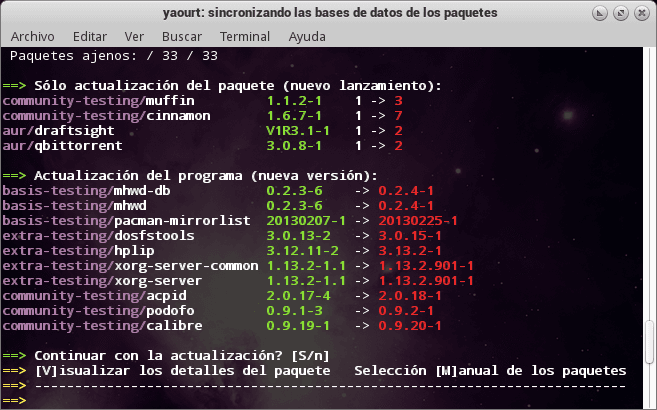
allservers actualizando el sistema
Por ejemplo:
- Actualiza la lista de los mirrors más recientes de Manjaro y esto es importante porque constantemente se dan de alta nuevos o dejan de funcionar otros.
- Crea una lista de los tres mejores mirrors basándose en su velocidad (rankmirrors).
- Sincroniza la base de datos de paquetes.
- Actualiza el sistema base y los paquetes AUR.
- Limpia el cache de paquetes usando el script cacheclean que elimina paquetes antiguos pero deja las dos últimas versiones. Esto es muy útil, porque ahorramos espacio, pero guardamos un par de paquetes por si algo sale mal y queremos hacer una desactualización ( downgrade).
Alservers necesita que instalemos primero el paquete cacheclean
yaourt -S cacheclean
Luego descargamos el script (copiar y pegar) y lo guardamos en el un archivo de nuestro home:
#!/bin/bash

# 27-April-2013: Updated to use the new pacman-mirrors -g to rankmirrors. :)
#
# allservers.sh - inspired by Manjaro's Carl & Phil, initially hung together
# by handy, the script's display prettied up & progress information added by Phil,
# the menu & wiki page added by handy.
# Latest revision now calls everything via the menu.
# The following wiki page is about this script:
# http://wiki.manjaro.org/index.php/Allservers.sh_Script:-_Rankmirrors,_Synchronise_Pacman_Database
# Following wiki page will introduce CacheClean & related information:
# http://wiki.manjaro.org/index.php/Maintaining_/var/cache/pacman/pkg_for_System_Safety
#___________________________________________________________
#
# allservers.sh is now completely menu driven. The Menu describes
# what it does for you, if you need more detail see the two
# wiki page links listed above.
###########################################################

err() {
    ALL_OFF="e[1;0m"
    BOLD="e[1;1m"
    RED="${BOLD}e[1;31m"
    local mesg=$1
    shift
    printf "${RED}==>${ALL_OFF}${BOLD} ${mesg}${ALL_OFF}n" "$@" >&2
}

msg() {
    ALL_OFF="e[1;0m"
    BOLD="e[1;1m"
    GREEN="${BOLD}e[1;32m"
    local mesg=$1
    shift
    printf "${GREEN}==>${ALL_OFF}${BOLD} ${mesg}${ALL_OFF}n" "$@" >&2
}

if $(whoami) != "root"; then
    err "Must use 'sudo su' before you run this script."
    exit
fi

# The menu:

clear # Clear the screen.

echo
echo -e "33[1m                      allservers.sh 33[0m"
echo
echo -e "e[1;32m    Enter your Option's number OR hit Return to exit. "
echo
echo "    [1] Rank Mirrors & update mirrorlist: pacman-mirrors -g "
echo "        & then sync/refresh package lists: pacman -Syy "
echo
echo "    [2] Option 1. plus Upgrade the System: pacman -Syu "
echo "        & then run CacheClean: cacheclean -v 2 "
echo
echo "    [3] Option 1. plus Upgrade the System & AUR: yaourt -Syua "
echo "        & then run CacheClean: cacheclean -v 2 "
echo
echo "    [4] Upgrade the System only: pacman -Syu "
echo "        & then run CacheClean: cacheclean -v 2 "
echo
echo "    [5] Upgrade the System & AUR only: yaourt - Syua "
echo "        & then run CacheClean: cacheclean -v 2 "
echo
echo "    CacheClean can be obtained via the AUR - yaourt -S cacheclean "
echo "    CacheClean is set to remove all installation packages in your "
echo "    /var/cache/pacman/pkg directory EXCEPT the two most recent "
echo "    versions. See the Manjaro wiki for details. "
echo -e "    http://wiki.manjaro.org/index.php/Maintaining_/var/cache/pacman/pkg_for_System_Safety 33[0m"
echo
echo -e "33[1m  Enter Your Choice: 33[0m"
echo

read option

case "$option" in
# Note variable is quoted.

"1")
    echo
    msg "Processing mirrors"
    echo
    pacman-mirrors -g
    echo
    msg "Refreshing your pacman databases"
    echo
    pacman -Syy
    ;;
    # Note double semicolon to terminate each option.

"2")
    echo
    msg "Processing mirrors"
    echo
    pacman-mirrors -g
    echo
    msg "Refreshing your pacman databases"
    echo
    pacman -Syy
    echo
    msg "Upgrading System:"
    echo
    pacman -Syu
    echo
    msg "System update complete."
    echo
    msg "CacheClean will now remove all but the 2 most "
    msg "recent versions of the installation packages in "
    msg "/var/cache/pacman/pkg directory:"
    echo
    cacheclean -v 2
    echo
    msg "CacheClean has done its job. "
    echo
    ;;
    # Note double semicolon to terminate each option.

"3")
    echo
    msg "Processing mirrors"
    echo
    pacman-mirrors -g
    echo
    msg "Refreshing your pacman databases"
    echo
    pacman -Syy
    echo
    msg "Upgrading System & AUR:"
    echo
    yaourt -Syua
    echo
    msg "System including AUR packages are up to date."
    echo
    msg "CacheClean will now remove all but the 2 most "
    msg "recent versions of the installation packages in "
    msg "/var/cache/pacman/pkg directory:"
    echo
    cacheclean -v 2
    echo
    msg "CacheClean has done its job. "
    echo
    ;;
    # Note double semicolon to terminate each option.

"4")
    echo
    msg "Upgrading System:"
    echo
    pacman -Syu
    echo
    msg "System update complete."
    echo
    msg "CacheClean will now remove all but the 2 most "
    msg "recent versions of the installation packages in "
    msg "/var/cache/pacman/pkg directory:"
    echo
    cacheclean -v 2
    echo
    msg "CacheClean has done its job. "
    echo
    ;;
    # Note double semicolon to terminate each option.

"5")
    echo
    msg "Upgrading System & AUR: "
    echo
    yaourt -Syua
    echo
    msg "System including AUR packages are up to date. "
    echo
    msg "CacheClean will now remove all but the 2 most "
    msg "recent versions of the installation packages in "
    msg "/var/cache/pacman/pkg directory:"
    echo
    cacheclean -v 2
    echo
    msg "CacheClean has done its job. "
    echo
    ;;

esac

exit 0
Para darle permisos de ejecución, en una terminal tecleamos:
chmod +x ./allservers.sh
Para ejecutar el script Allservers:
sudo ./allservers.sh
Y elegir alguna de las opciones del menú.
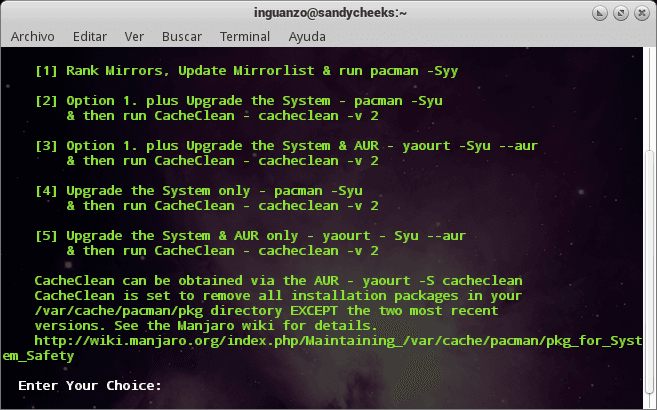
allservers menu principal
Simplemente la actualización de mirrors y su calificación hacen que este script valga la pena.
Actualización 27-abr-2013
Hubo una actualización a este script, usa la nueva estructura de paquetes y el comando pacman-mirrors -g para actualizar y calificar los mejores mirrors para Manjaro.
#!/bin/bash

# 27-April-2013: Updated to use the new pacman-mirrors -g to rankmirrors. :)
#
# allservers.sh - inspired by Manjaro's Carl & Phil, initially hung together
# by handy, the script's display prettied up & progress information added by Phil,
# the menu & wiki page added by handy.
# Latest revision now calls everything via the menu.
# The following wiki page is about this script:
# http://wiki.manjaro.org/index.php/Allservers.sh_Script:-_Rankmirrors,_Synchronise_Pacman_Database
# Following wiki page will introduce CacheClean & related information:
# http://wiki.manjaro.org/index.php/Maintaining_/var/cache/pacman/pkg_for_System_Safety
#___________________________________________________________
#
# allservers.sh is now completely menu driven. The Menu describes
# what it does for you, if you need more detail see the two
# wiki page links listed above.
###########################################################

err() {
    ALL_OFF="e[1;0m"
    BOLD="e[1;1m"
    RED="${BOLD}e[1;31m"
    local mesg=$1
    shift
    printf "${RED}==>${ALL_OFF}${BOLD} ${mesg}${ALL_OFF}n" "$@" >&2
}

msg() {
    ALL_OFF="e[1;0m"
    BOLD="e[1;1m"
    GREEN="${BOLD}e[1;32m"
    local mesg=$1
    shift
    printf "${GREEN}==>${ALL_OFF}${BOLD} ${mesg}${ALL_OFF}n" "$@" >&2
}

if $(whoami) != "root"; then
    err "Must use 'sudo su' before you run this script."
    exit
fi

# The menu:

clear # Clear the screen.

echo
echo -e "33[1m                      allservers.sh 33[0m"
echo
echo -e "e[1;32m    Enter your Option's number OR hit Return to exit. "
echo
echo "    [1] Rank Mirrors & update mirrorlist: pacman-mirrors -g "
echo "        & then sync/refresh package lists: pacman -Syy "
echo
echo "    [2] Option 1. plus Upgrade the System: pacman -Syu "
echo "        & then run CacheClean: cacheclean -v 2 "
echo
echo "    [3] Option 1. plus Upgrade the System & AUR: yaourt -Syua "
echo "        & then run CacheClean: cacheclean -v 2 "
echo
echo "    [4] Upgrade the System only: pacman -Syu "
echo "        & then run CacheClean: cacheclean -v 2 "
echo
echo "    [5] Upgrade the System & AUR only: yaourt - Syua "
echo "        & then run CacheClean: cacheclean -v 2 "
echo
echo "    CacheClean can be obtained via the AUR - yaourt -S cacheclean "
echo "    CacheClean is set to remove all installation packages in your "
echo "    /var/cache/pacman/pkg directory EXCEPT the two most recent "
echo "    versions. See the Manjaro wiki for details. "
echo -e "    http://wiki.manjaro.org/index.php/Maintaining_/var/cache/pacman/pkg_for_System_Safety 33[0m"
echo
echo -e "33[1m  Enter Your Choice: 33[0m"
echo

read option

case "$option" in
# Note variable is quoted.

"1")
    echo
    msg "Processing mirrors"
    echo
    pacman-mirrors -g
    echo
    msg "Refreshing your pacman databases"
    echo
    pacman -Syy
    ;;
    # Note double semicolon to terminate each option.

"2")
    echo
    msg "Processing mirrors"
    echo
    pacman-mirrors -g
    echo
    msg "Refreshing your pacman databases"
    echo
    pacman -Syy
    echo
    msg "Upgrading System:"
    echo
    pacman -Syu
    echo
    msg "System update complete."
    echo
    msg "CacheClean will now remove all but the 2 most "
    msg "recent versions of the installation packages in "
    msg "/var/cache/pacman/pkg directory:"
    echo
    cacheclean -v 2
    echo
    msg "CacheClean has done its job. "
    echo
    ;;
    # Note double semicolon to terminate each option.

"3")
    echo
    msg "Processing mirrors"
    echo
    pacman-mirrors -g
    echo
    msg "Refreshing your pacman databases"
    echo
    pacman -Syy
    echo
    msg "Upgrading System & AUR:"
    echo
    yaourt -Syua
    echo
    msg "System including AUR packages are up to date."
    echo
    msg "CacheClean will now remove all but the 2 most "
    msg "recent versions of the installation packages in "
    msg "/var/cache/pacman/pkg directory:"
    echo
    cacheclean -v 2
    echo
    msg "CacheClean has done its job. "
    echo
    ;;
    # Note double semicolon to terminate each option.

"4")
    echo
    msg "Upgrading System:"
    echo
    pacman -Syu
    echo
    msg "System update complete."
    echo
    msg "CacheClean will now remove all but the 2 most "
    msg "recent versions of the installation packages in "
    msg "/var/cache/pacman/pkg directory:"
    echo
    cacheclean -v 2
    echo
    msg "CacheClean has done its job. "
    echo
    ;;
    # Note double semicolon to terminate each option.

"5")
    echo
    msg "Upgrading System & AUR: "
    echo
    yaourt -Syua
    echo
    msg "System including AUR packages are up to date. "
    echo
    msg "CacheClean will now remove all but the 2 most "
    msg "recent versions of the installation packages in "
    msg "/var/cache/pacman/pkg directory:"
    echo
    cacheclean -v 2
    echo
    msg "CacheClean has done its job. "
    echo
    ;;

esac

exit 0
Si su sistema tiene instalado pacman 4.1 (o superior) probablemente les convenga usar este script en lugar del anterior.